πŸ“· Camera-based item identification Β· works offline

Show the item to the camera.
Know what it is and where it lives.

Obo ItemID looks at a real item β€” a bolt, a spare part, a fitting β€” and tells you its name, its item code and the exact rack or bin it belongs to. No part numbers to remember, no catalogue to flip through, no experienced person needed.

Windows desktop app Β· 30-day trial built in Β· runs on your own PC Β· no internet needed after install

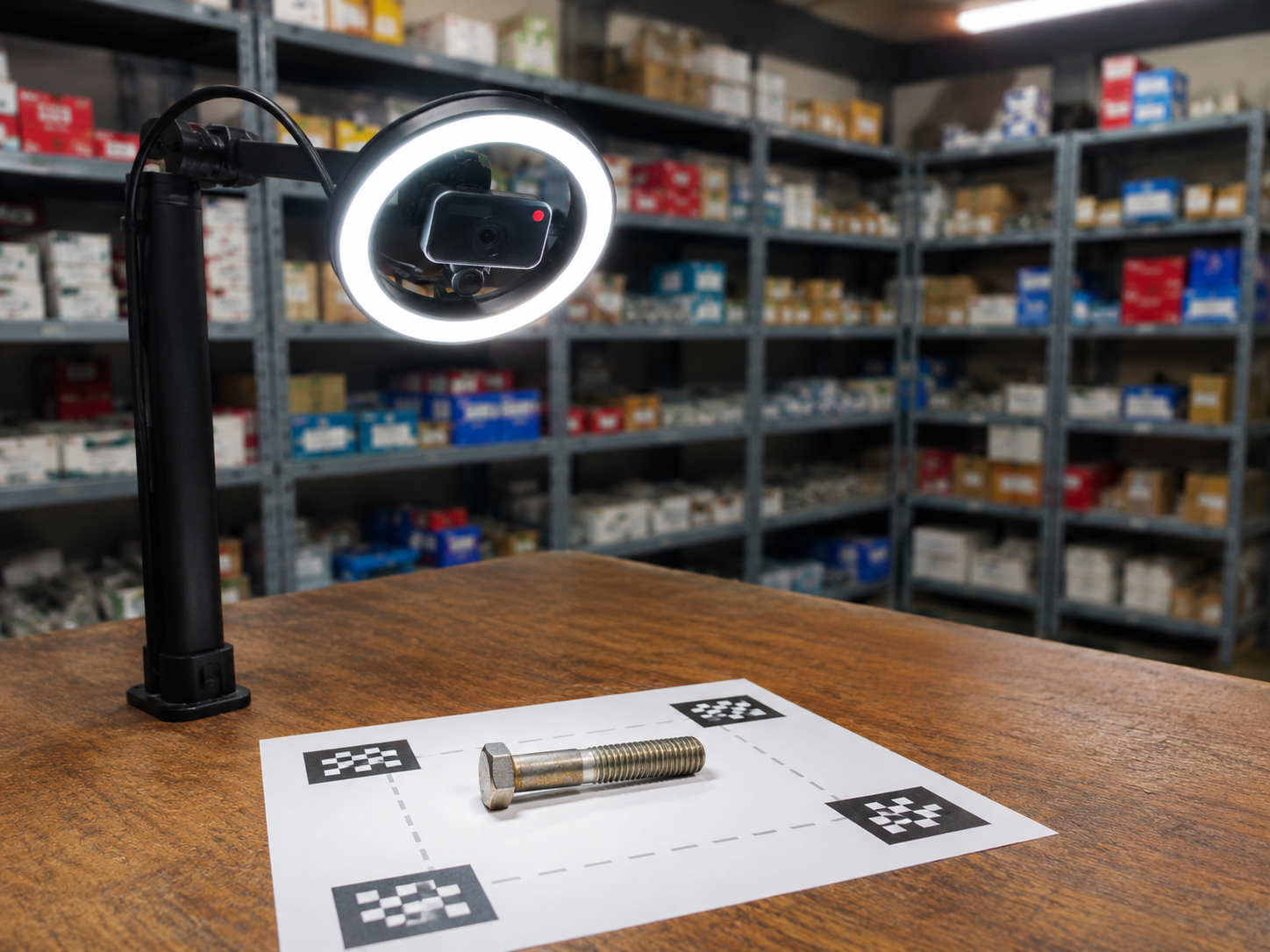
A ring-light USB camera on a stand looks down at a printed marker sheet on a workbench, with a hex bolt placed in the detection zone and stocked racks behind.
1 Β· Put the item on the sheet
Matched item Hex Bolt M8Γ—40 SKU-1001 Β· 40.2 Γ— 13.1 mm Bin A-14 A-12 A-13 A-14 B-01 B-02 B-03 C-01 C-02 C-03 stored here The rack β€” the app points to the exact bin 2 Β· Press Space β€” it is identified 3 Β· Walk to the bin it names

What it does for you

Three problems it removes on day one

Stores, service centres and spare-part counters lose the most time on one question: β€œwhat is this piece, and where do we keep it?”

Find items easily

Hold the item in front of the camera and press one key. In about a second you get the item name, its code and its stored details β€” including the rack or bin number. No typing, no searching, no guessing.

Seconds instead of minutes

No experienced person needed

The knowledge sits in the app, not in one person’s head. A new joiner, a helper or a stand-in on the counter can identify parts correctly on their first day β€” so work doesn’t stop when your expert is on leave.

Anyone can run it

Bills straight into Output Books

Scan the item and it is typed into your open invoice by itself β€” the item row in Output Books fills in and moves on, exactly like a barcode scanner. No writing the code on paper, no typing it again at the billing screen.

Works like a barcode β€” without a barcode

Works with Output Books

Scan the item β€” it lands in the invoice

Open your invoice, click the item box, and scan. Obo ItemID types the matched item straight into that box and presses Enter for you β€” the same thing a barcode scanner does, for parts that have no barcode on them.

Obo ItemID Β· Scan & Find Matched Hex Bolt M8Γ—40 SKU-1001 press Space β€” or let it scan by itself types it + Enter New Invoice INV0030 Β· 28/07/2026 S.NoItem SKUQty Rate β‚Ή 1 Hex Bolt M8Γ—40 SKU-1001 1 24.00 23 βœ“ typed automatically β€” no keyboard needed

Nothing to integrate

It types into whatever box has the cursor β€” Output Books, Tally, Excel, a web page. No plug-in to install and no change to your billing software.

You choose what it sends

SKU only, item name only, β€œSKU Β· Name”, or the full detail list β€” whichever your invoice item box expects.

Safe by design

It only types on a confident match, and never while Obo itself is the window in front β€” so stray keystrokes can’t land in the wrong place. Every match can also be copied to the clipboard instead.

How it works

Four steps β€” and only the first two are set-up

Set it up once. After that your team only ever does step 3.

1

Connect your items

Point the app at Output Books, an Excel/CSV file, a SQL database or an API β€” or just type items into the built-in catalogue.

2

Teach each item

Pick an item, place it on the sheet and capture a few angles. That is the whole training β€” a few seconds per item, done once.

3

Scan to identify

Show any item to the camera and press Space. Turn it and press again for a tricky piece β€” every angle sharpens the answer.

4

Get name, location β€” or the invoice line

The matched item appears with its code, details and bin number β€” and if your invoice is open, the item is typed straight into it.

Features

Built for a real counter, not a lab

Everything runs on one ordinary Windows PC with a USB camera.

πŸ“

Real size in millimetres

Print the marker sheet once and the app measures each item’s true length and width β€” so an M8 bolt is never confused with an M10.

πŸ”„

Multi-angle scanning

Press scan again after turning the item. The app combines the poses and tells look-alike parts apart instead of guessing.

🎯

Confident match or a short list

A strong match is shown as one clear answer. A weak one shows the top three candidates β€” it never hides its uncertainty from you.

πŸ–οΈ

Hands-free mode

Place an item in the zone and it scans by itself β€” useful when both hands are busy or items come one after another.

🧾

Types into your invoice

On a confident match the item is typed (with Enter) into the focused box of Output Books or any other app β€” or copied to the clipboard.

⌨️

Keyboard-first

Space or Enter to scan, N for a new session, Ctrl+F to search. The whole app can be driven without touching the mouse.

πŸ”’

PIN lock

Scanning stays open for everyone; training, data settings and configuration sit behind a PIN β€” with security questions for recovery.

πŸ“Ά

Works offline

Recognition runs on the PC itself. No cloud account, no photo uploads, no internet bill β€” your item photos never leave the building.

πŸ—‚οΈ

Built-in catalogue

No item master yet? Add items by hand with your own columns, and import or export the whole list as Excel/CSV whenever you like.

♻️

Stays in sync

Items removed at the source are hidden automatically β€” and if they come back, they return already trained.

πŸ’½

Simple install

One Windows installer, one PC, one USB camera. No server, no GPU and nothing for IT to maintain.

Your data

Keep your item master where it already is

Obo ItemID reads your item list from wherever it already lives β€” it never asks you to re-key it. And whatever the source, a scanned item can still be typed straight into your invoice.

πŸ“ŠExcel / CSV Re-imported automatically whenever the file changes
πŸ—„οΈSQL database Details looked up live, so they are never stale
πŸ”ŒAPI Any HTTP endpoint, with your own field mapping
πŸ“’Built-in catalogue Type items in with your own columns β€” no external system needed

Try it with your own items

Install it on one PC, connect your item list and train ten parts. You will know within an hour whether it fits your counter β€” the 30-day trial is built in, no key and no card needed to start.

Windows 10 / 11 Β· works with any USB camera Β· runs offline after install

Screenshot, full size